BookWhip — Appointment Booking, Quotes & Jobs
Everything a service business needs inside WordPress: online booking, quotes with revisions, jobs with technicians, invoices, deposits and online payments.
Requirements
- WordPress 6.2 or newer, PHP 7.4 or newer (8.x recommended), MySQL 5.7+ / MariaDB 10.3+.
- Works with any theme. Elementor and WooCommerce are optional.
- WP-Cron should run (it does on almost every host) — it sends reminders and frees unpaid bookings.
Installation
- In WordPress go to Plugins → Add New → Upload Plugin and choose
bookwhip.zipfrom your download. - Click Install Now, then Activate.
- The Welcome to BookWhip screen opens. BookWhip also creates four pages for your customers: Book an Appointment, Your Quote, Your Invoice and My Bookings.
Quick start (5 minutes)
- Pick a business template on the Welcome screen (or add services yourself under BookWhip → Services).
- Open BookWhip → Staff, add the people customers book, tick their services and set their weekly hours.
- Check BookWhip → Settings: currency, how far ahead people may book, minimum notice and payments.
- Visit the Book an Appointment page — your booking form is live. Add it to your menu.
Business templates
One click adds typical services with prices, durations and deposits for: Clinic & health, Salon & spa, Consultant & coach, Tutor & lessons, Fitness & yoga, Home services. Nothing is ever deleted and running a template twice does not create duplicates. If you have no staff yet, you are added as the first staff member with Monday–Friday hours.
Services
BookWhip → Services → Add service.
| Field | What it does |
|---|---|
| Duration / Price | Default length and price. Each staff member can have their own price and duration. |
| How customers book | Instant – confirmed right away. On approval – you confirm each booking. Quote first – customers describe the job and you send a price. |
| Deposit | None, fixed amount or percent. Bookings with a deposit are held until it is paid (see Payments). |
| Buffer before / after | Free time kept before and after each appointment (cleanup, travel). |
| Seats per slot | More than 1 makes it a group class (several customers share the same time). |
| Online meeting | None, Zoom or Google Meet — a link is created when the booking is confirmed. |
| Price (EUR, GBP …) | Appears when you add extra currencies in Settings. |
Staff & working hours
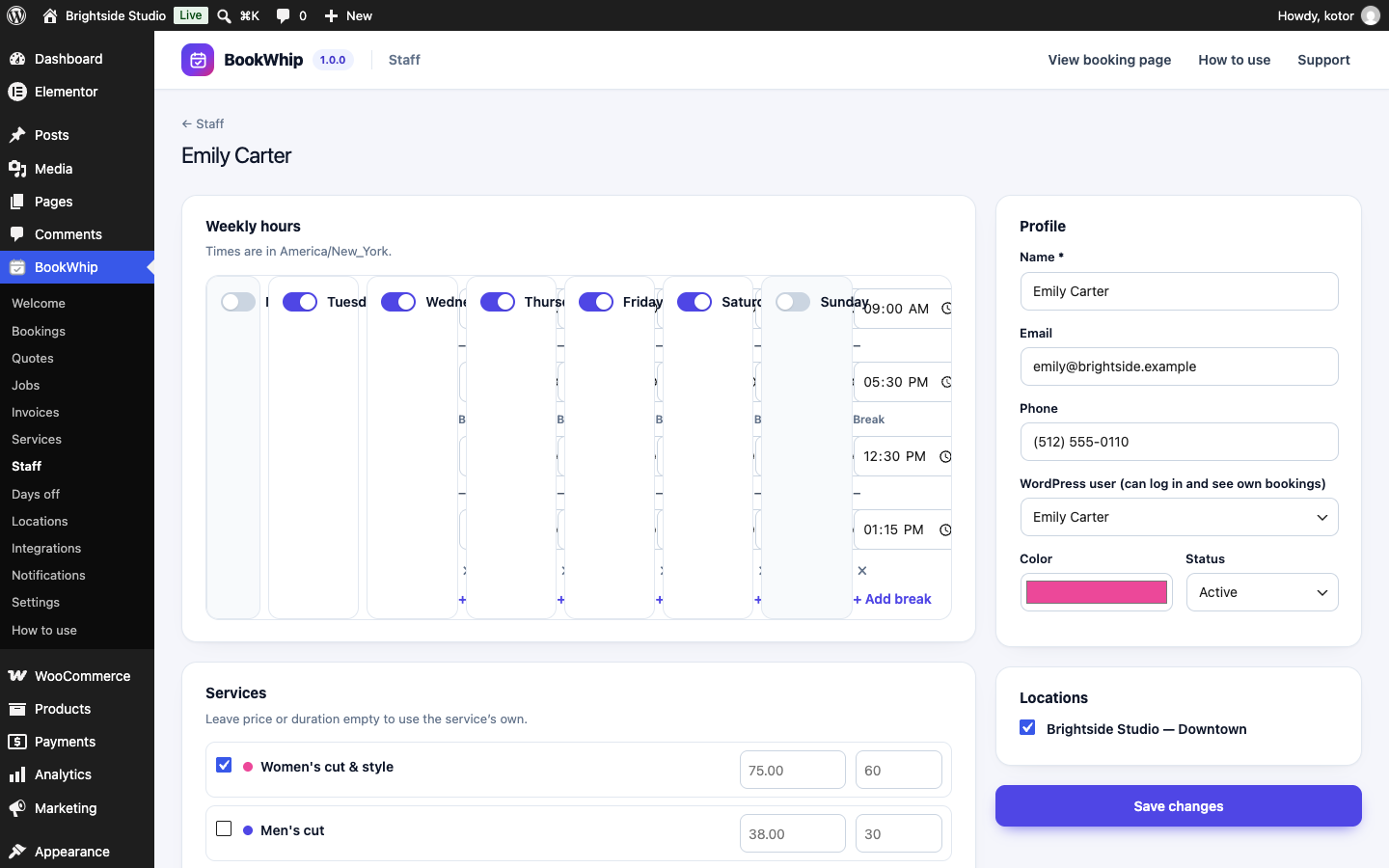
BookWhip → Staff. For each person: weekly hours (switch a day on or off, add one or more breaks), the services they offer (with optional own price and duration), locations, color and an optional WordPress user so they can sign in and see My Schedule.
Days off & holidays
BookWhip → Days off. Choose Whole business for holidays or a person for vacations. Leave the hours empty for whole days. Nobody can book in these times.
Locations
Optional. Add branches with their own address and time zone, then link staff to them.
Customer pages
| Page | Shortcode | Purpose |
|---|---|---|
| Book an Appointment | [bookwhip_booking] | The booking form (and quote requests). |
| My Bookings | [bookwhip_portal] | Customer portal: bookings, quotes, invoices; reschedule and cancel. |
| Your Quote | [bookwhip_quote] | Opened from the private link in the quote email. |
| Your Invoice | [bookwhip_invoice] | Opened from the invoice email; shows the pay buttons. |
Bookings calendar
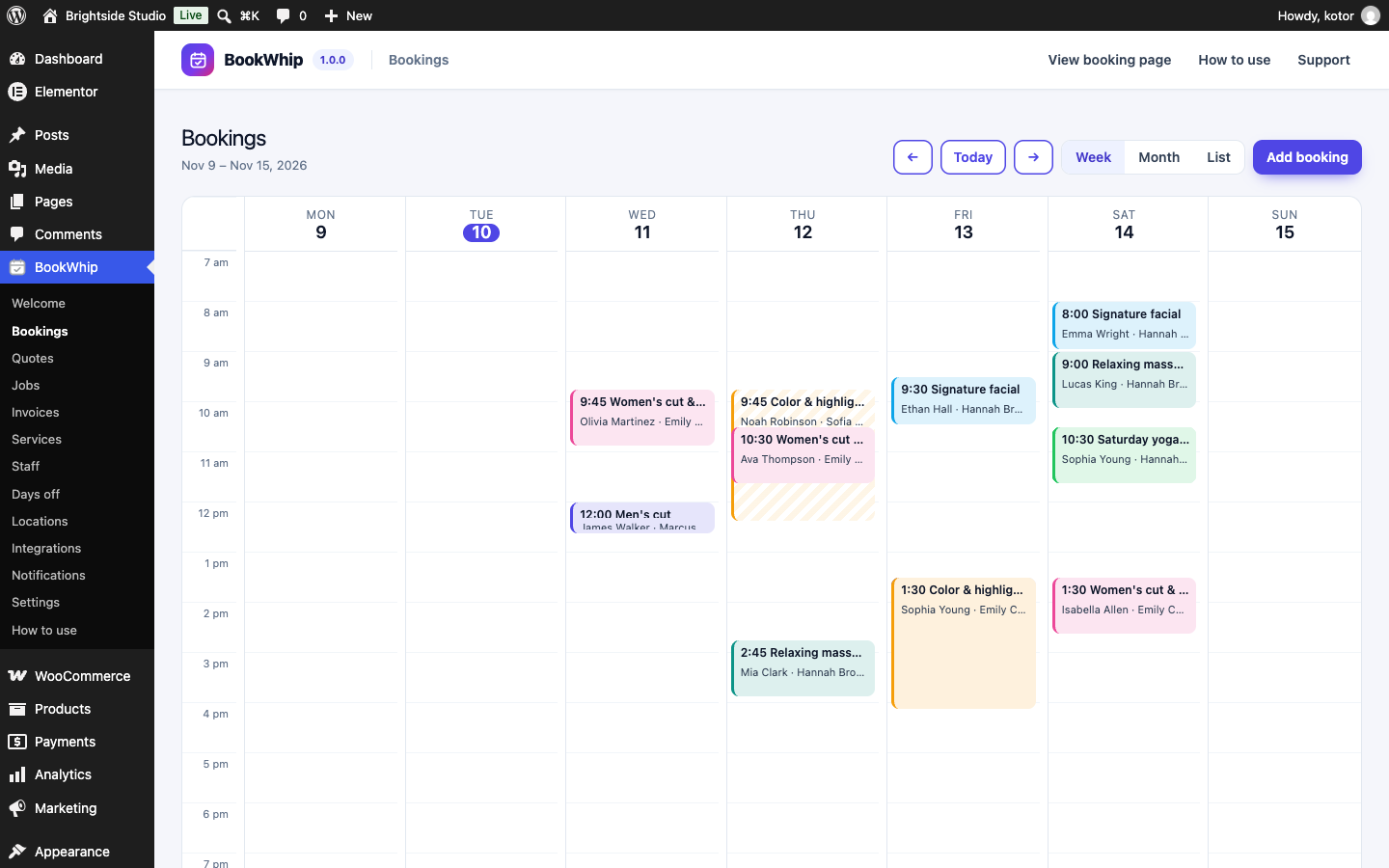
BookWhip → Bookings shows a week, month or list view. Scheduled jobs appear in teal. Click a booking to change its status (Confirmed, Done, No-show, Cancelled), move it to another time or see its payments. Add booking takes phone bookings — the time is checked against hours, breaks, days off and other bookings exactly like online.
Quotes
- A customer picks a Quote first service and describes the job (address, details, preferred date).
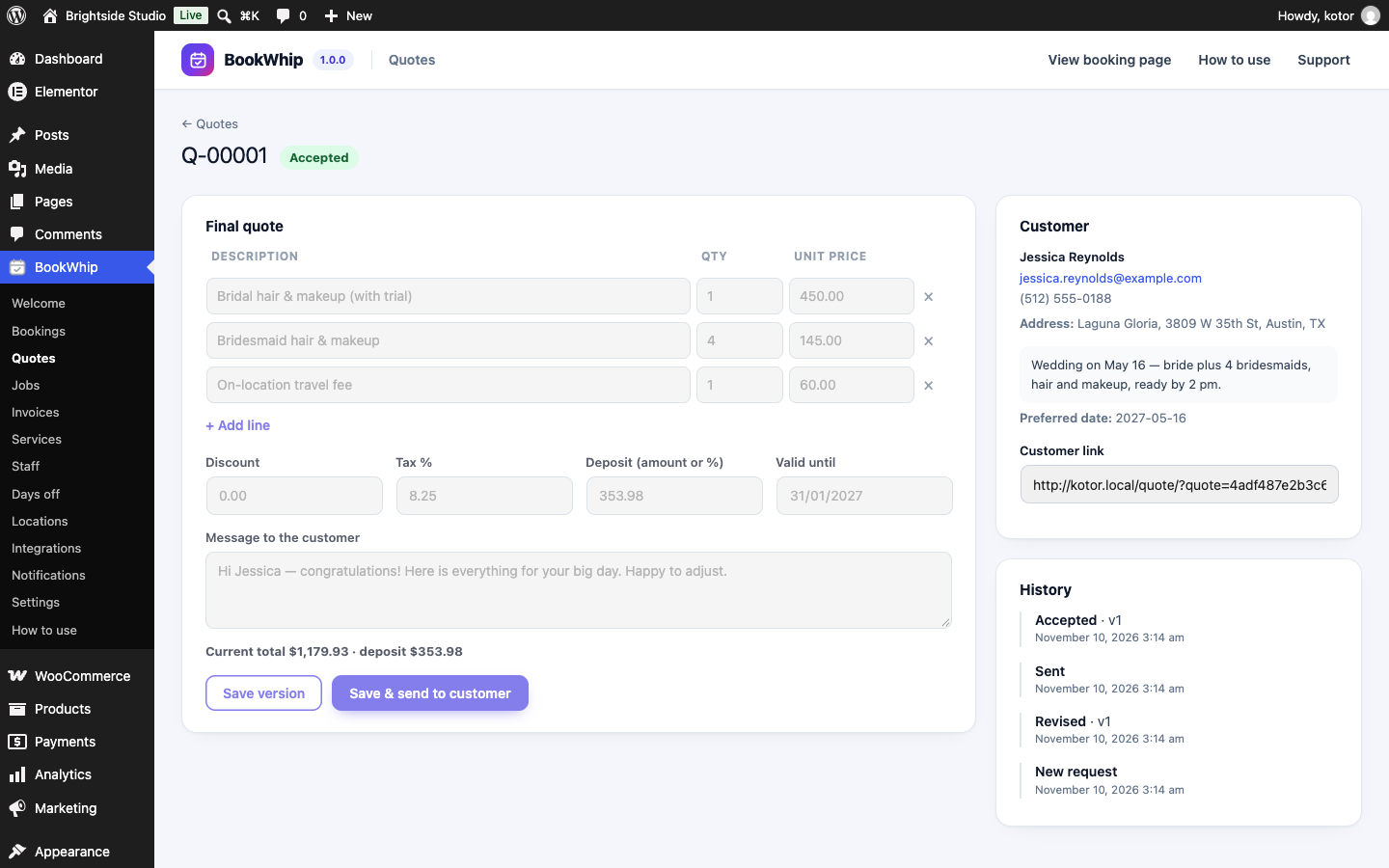
- You open BookWhip → Quotes, add lines, discount, tax %, deposit (amount or %), a message and an expiry date, then Save & send.
- The customer opens the private link and can accept, ask for changes or decline. Asking for changes lets you send a new version — every version is kept in the history.
- An accepted quote becomes a job, and a deposit invoice is created when the quote has a deposit.
Jobs & technicians
BookWhip → Jobs. Schedule a job, choose one or more technicians (each is checked for other bookings, jobs and time off) and move it through In progress → Completed. Completing a job creates the balance invoice (quote total minus what was already invoiced). The customer and each technician get an email with a calendar file.
Invoices
BookWhip → Invoices lists every invoice with billed, paid and outstanding totals. Record in-person payments on the job or booking screen. Paid amounts are always added up from the payment records, so totals cannot drift.
Dashboard
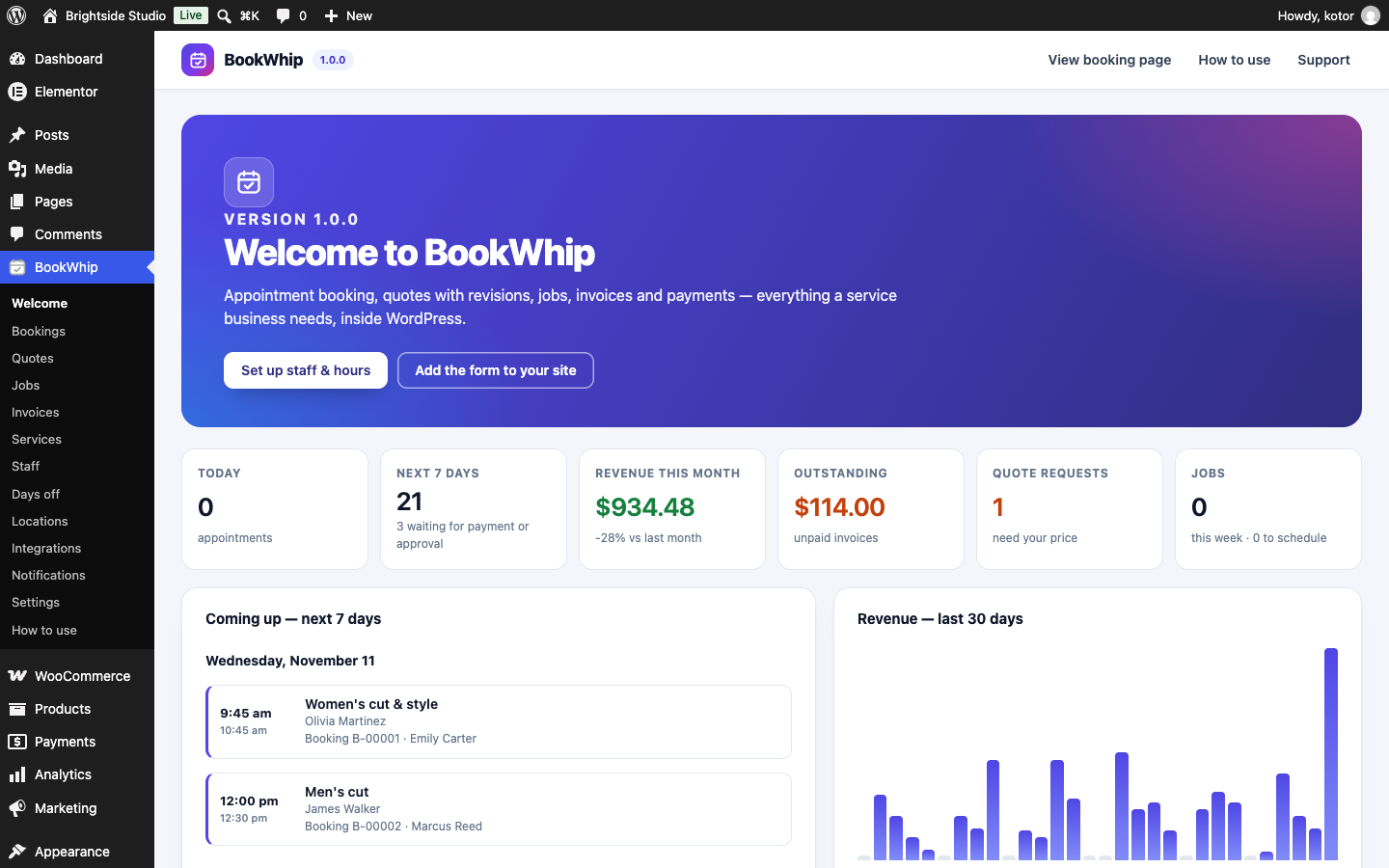
The Welcome screen shows today's and the next 7 days' appointments, this month's revenue compared to last month, outstanding invoices, new quote requests, upcoming jobs and a 30-day revenue chart.
Staff: My Schedule
Staff linked to a WordPress user (role BookWhip Staff) see only My Schedule: their own appointments and jobs for the next 14 days, with Start / Done / No-show buttons. They cannot see settings, other people's data or money.
Booking form
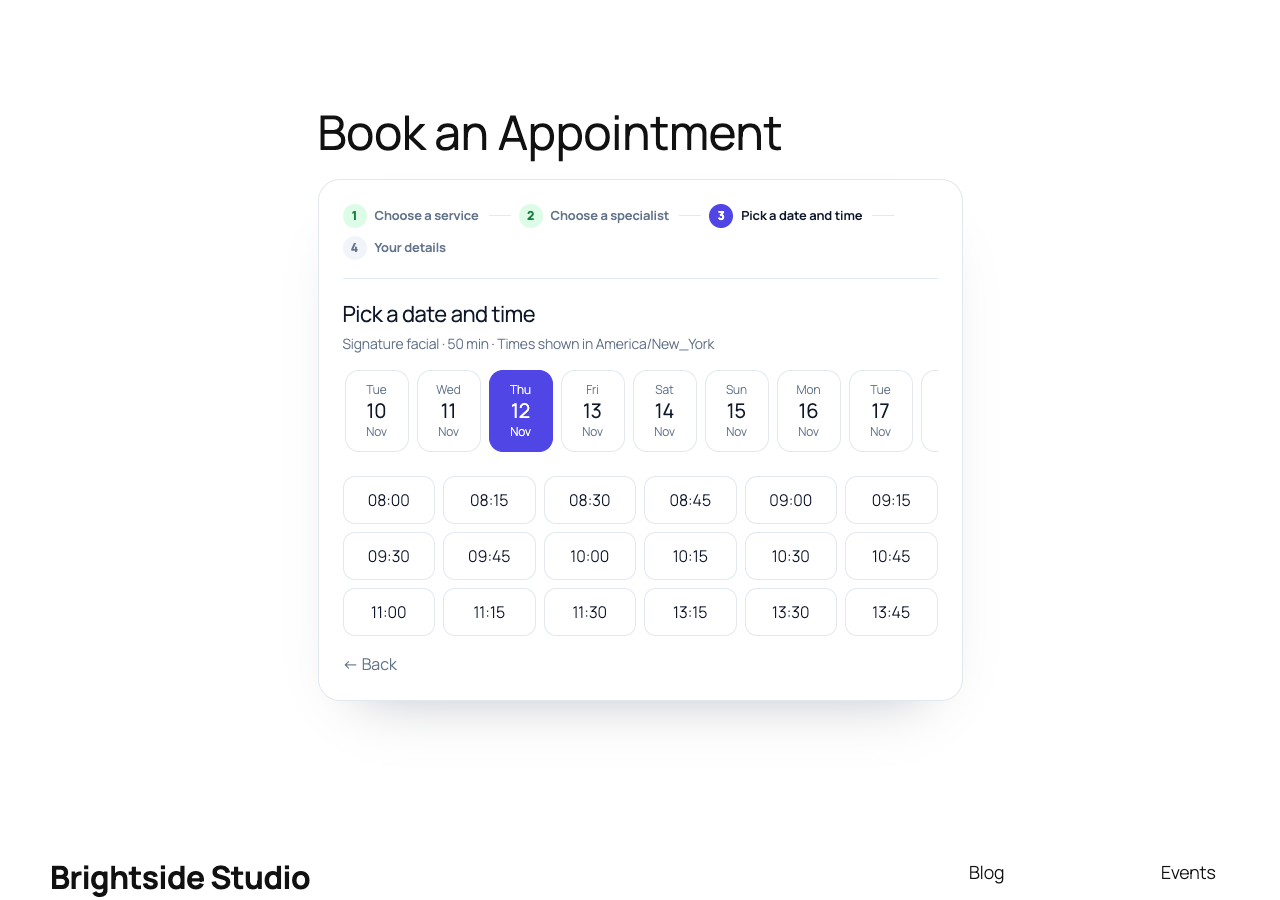
Customers pick a service → specialist (or Any available) → date and time → their details. Times are shown in your business time zone. Every time is checked again on the server when they confirm, and a per-staff lock makes double bookings impossible — even when two people click at the same moment.
Repeating visits
When Settings → Customers can book repeating visits is on, customers can choose every week, every 2 weeks or every month for 2–12 visits. Each visit is checked; dates that are not free (for example a holiday) are skipped and shown to the customer. The whole series shares one deposit invoice and is confirmed — or released — together.
Several services at once
On the details step customers can press Add another service (up to 6). All of them are booked in one order with one deposit. If one time was taken meanwhile, nothing is booked and the customer is told which one.
Customer portal
Every email contains a private Manage your booking link to My Bookings. Customers see upcoming and past bookings, quotes and invoices, and can reschedule (same specialist) or cancel up to the number of hours you allow (Notifications → rules, default 24 hours).
Customer accounts
Customers never need an account. If you like, turn on Settings → Offer an optional customer account: a checkbox appears on the booking form and creates a WordPress account with the BookWhip Customer role. These users can never open the WordPress dashboard — they are sent to their portal, and the admin bar is hidden for them.
Extra questions
Settings → Extra questions on the booking form. Add short text, long text, dropdown or checkbox questions and mark them as required. Answers appear on the booking and in your “New booking” email (placeholder {custom_fields}).
Payments & deposits
Turn methods on in Settings → Payments. A booking that needs a deposit shows Pay deposit right after booking and in the email; it is confirmed automatically when the deposit is paid. If it is not paid within the hold time (default 30 minutes) the booking is cancelled and the time freed. All keys are stored encrypted and never shown again.
Stripe
- In Stripe → Developers → API keys copy the Secret key.
- In Stripe → Developers → Webhooks add an endpoint with the URL shown in BookWhip Settings and the event
checkout.session.completed. Copy the Signing secret. - Paste both into Settings → Payments → Stripe and tick Stripe.
Every webhook is signature-checked and duplicate events are ignored.
PayPal
Create a REST app at developer.paypal.com, copy its Client ID and Secret into Settings, and untick Sandbox when you go live. Payments are captured on your server after the customer approves them.
WooCommerce
Tick WooCommerce checkout to use any gateway you already set up in WooCommerce. BookWhip creates an order for the amount due; when the order is processing or completed the payment is recorded once.
Several currencies
Add extra currencies in Settings, then give services a price in each one. Customers switch the currency on the booking form; only services priced in that currency are shown, and the booking, invoice and payment use it. There are no live exchange rates — you set each price.
Emails, SMS & WhatsApp
BookWhip → Notifications. Thirteen messages — booking received / confirmed / moved / cancelled, 24-hour reminder, quote sent and answered, job scheduled (customer and technicians), invoice and receipt. Edit subject and text, choose email, SMS and/or WhatsApp per message, and set your business name and email color. Confirmations include a calendar (.ics) file.
Placeholders: {first_name} {customer_name} {service} {staff} {date} {time} {booking_number} {amount} {portal_link} {quote_link} {invoice_link} {address} {business_name} {custom_fields}.
SMS / WhatsApp use your own Twilio account: paste the Account SID, Auth token and sender numbers.
Google Calendar & Google Meet
- In Google Cloud create an OAuth client (type Web application) and enable the Google Calendar API.
- Add the redirect URI shown on BookWhip → Integrations.
- Paste the Client ID and secret, save, then press Connect Google Calendar for each staff member.
Confirmed bookings are added to that person's calendar, moved and cancelled bookings are updated, and their busy times in Google block those times in BookWhip. Services set to Google Meet get a Meet link.
Zoom
Create a Server-to-Server OAuth app in the Zoom App Marketplace (scope meeting:write) and paste the Account ID, Client ID and secret on the Integrations screen. Services set to Zoom get a meeting link when confirmed.
Elementor widgets
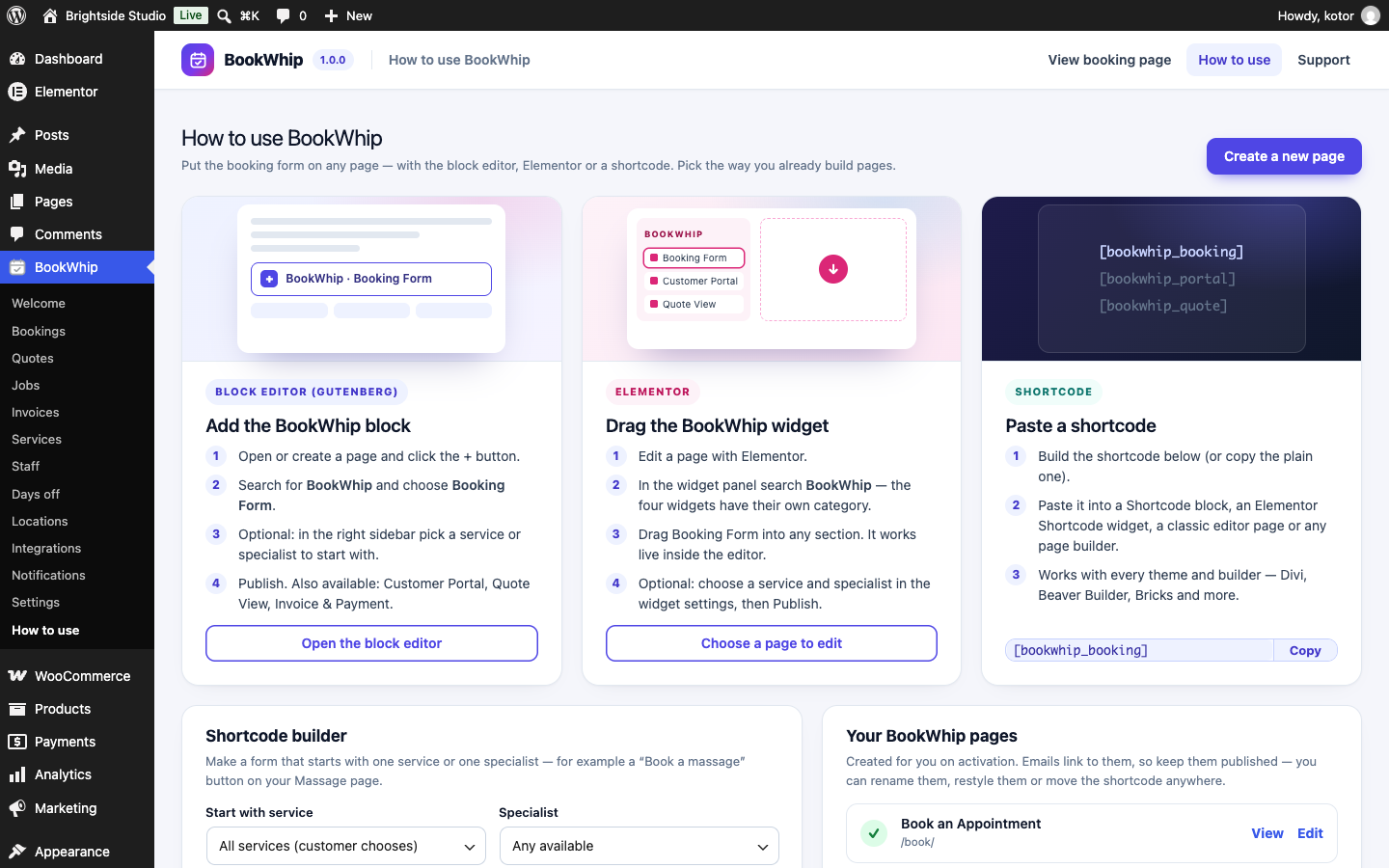
Search for BookWhip in the Elementor panel: Booking Form (with optional preselected service and specialist), Customer Portal, Quote View and Invoice & Payment. The form works inside the Elementor editor too.
Gutenberg blocks
In the block editor add BookWhip · Booking Form, Customer Portal, Quote View or Invoice & Payment. The Booking Form block can preselect a service and specialist in the sidebar.
Shortcodes
| Shortcode | Options |
|---|---|
[bookwhip_booking] | service="ID" starts with that service; staff="ID" preselects a person. Without a shortcode, link to the booking page with ?service=ID&staff=ID. The builder on BookWhip → How to use writes both for you. |
[bookwhip_portal] | — |
[bookwhip_quote] | — |
[bookwhip_invoice] | — |
Settings reference
| Setting | Default |
|---|---|
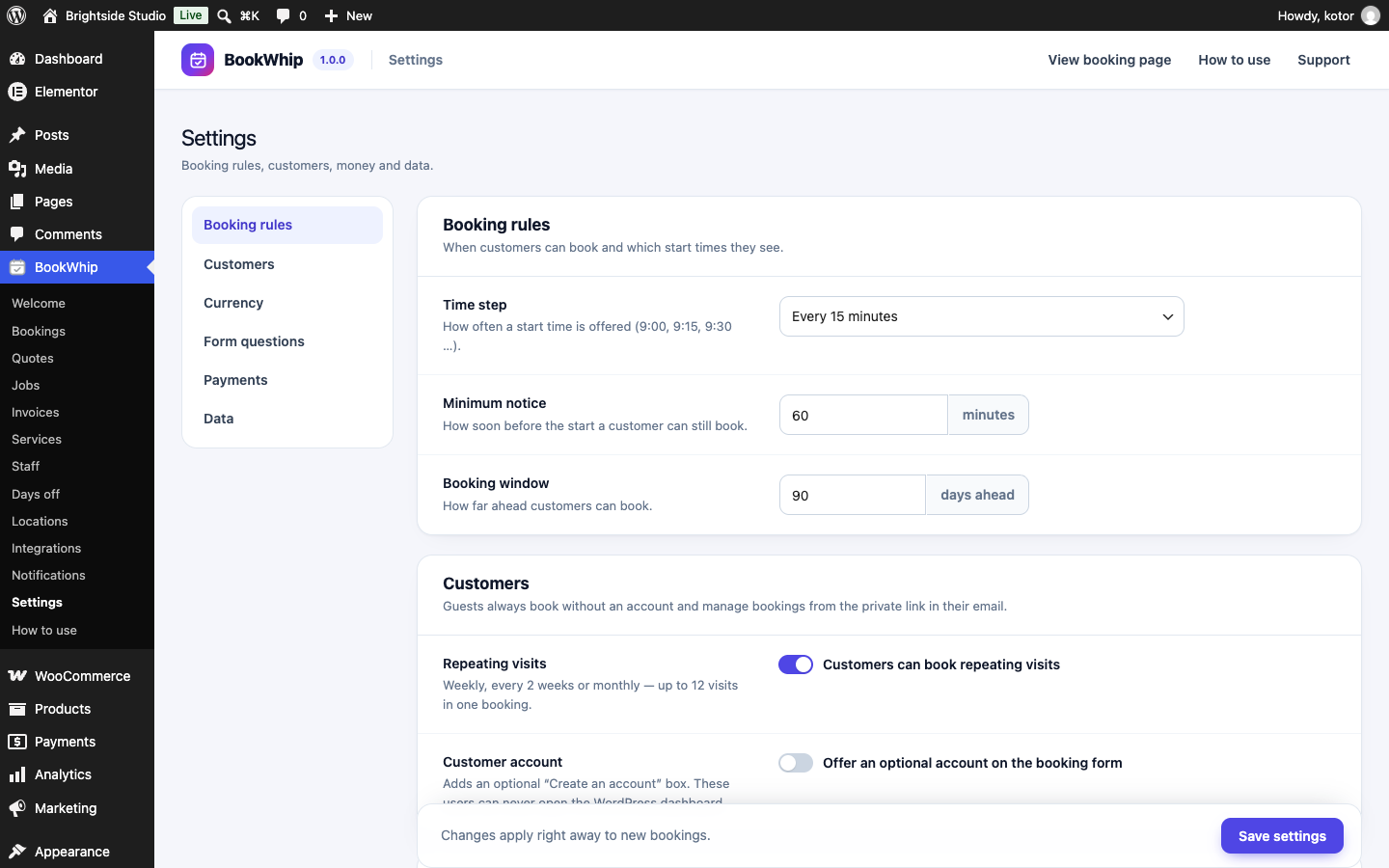
| Time step | 15 minutes — how often a start time is offered |
| Minimum notice | 60 minutes before the start |
| Book up to | 90 days ahead |
| Repeating visits | On |
| Optional customer account | Off |
| Hold unpaid bookings | 30 minutes |
| Reschedule / cancel online | On, up to 24 hours before |
| Delete data when the plugin is deleted | Off (your data is kept) |
Roles & security
- Administrators get the
bookwhip_managecapability. - BookWhip Staff see only My Schedule. BookWhip Customer never reaches wp-admin.
- Prices, deposits and availability are always calculated on the server; private links use long random tokens; forms use nonces; bookings from one connection are rate-limited.
Privacy & GDPR
BookWhip adds an exporter and an eraser to Tools → Export / Erase Personal Data. Erasing removes the customer's personal details while keeping booking, invoice and payment records (without the person) for your accounts. A suggested text is added to Settings → Privacy.
For developers
Actions: bookwhip_booking_created, bookwhip_booking_confirmed, bookwhip_booking_cancelled, bookwhip_booking_rescheduled, bookwhip_quote_requested, bookwhip_quote_sent, bookwhip_quote_accepted, bookwhip_job_created, bookwhip_job_scheduled, bookwhip_invoice_created, bookwhip_payment_recorded, bookwhip_notification_sent. Filter: bookwhip_external_busy (block times from any external calendar). REST namespace: bookwhip/v1. All tables use the prefix {wp_prefix}bookwhip_.
FAQ
Do customers need an account?
No. They book as guests and manage everything from the private link in their email.
Can two people book the same time?
No. The server re-checks every time inside a per-staff lock.
Is Elementor or WooCommerce required?
No — both are optional.
Emails do not arrive.
Install an SMTP plugin (for example WP Mail SMTP) so your site sends mail reliably.
Can I translate BookWhip?
Yes. The languages/bookwhip.pot file works with Loco Translate or Poedit. RTL languages are supported.
Changelog
1.0.0 — November 2026
- First release
Support
Questions or a problem? Open a ticket at fekbd.com/support. Please include your WordPress and PHP versions and what you tried. Support covers help with the plugin's features and bug fixes.